
Zoho CRM’s standard export gives you one module at a time. That works fine for a flat contact list. However, the moment you need deals joined with their accounts, or contacts filtered by a field on a parent record, flat exports fall short.
This is the job of Zoho CRM COQL queries. COQL — CRM Object Query Language — is Zoho’s SQL-like query language. In this guide, you will run COQL from Google Sheets with the G-Integrator for Zoho CRM add-on. First, we will cover the syntax. Then we will walk through real examples, including joins and one-to-many pulls.
What is COQL?
COQL lets you query Zoho CRM records with SELECT statements, much like SQL:
SELECT Last_Name, Email, Lead_Source
FROM Contacts
WHERE Lead_Source = 'Web'
If you know basic SQL, you already know most of COQL. Still, there are a few Zoho-specific rules to keep in mind:
- A WHERE clause is required. Zoho rejects queries without one. If you want all records, use a condition that always holds, such as
WHERE id is not null. - Field names use API names. Write “
Account_Name", not “Account Name”. You can check API names under Setup → Developer Space → APIs in Zoho, or simply pick fields from the add-on’s field list. - Joins work through lookup fields. Dot notation reaches fields on a related record, up to two relations deep.
What you’ll need
- A Zoho CRM account (any edition)
- A Google account
- The G-Integrator for Zoho CRM add-on from the Google Workspace Marketplace — it comes with a free two-week trial
No API keys and no code outside the query itself. Moreover, the add-on handles paging for you, so large results arrive in full.
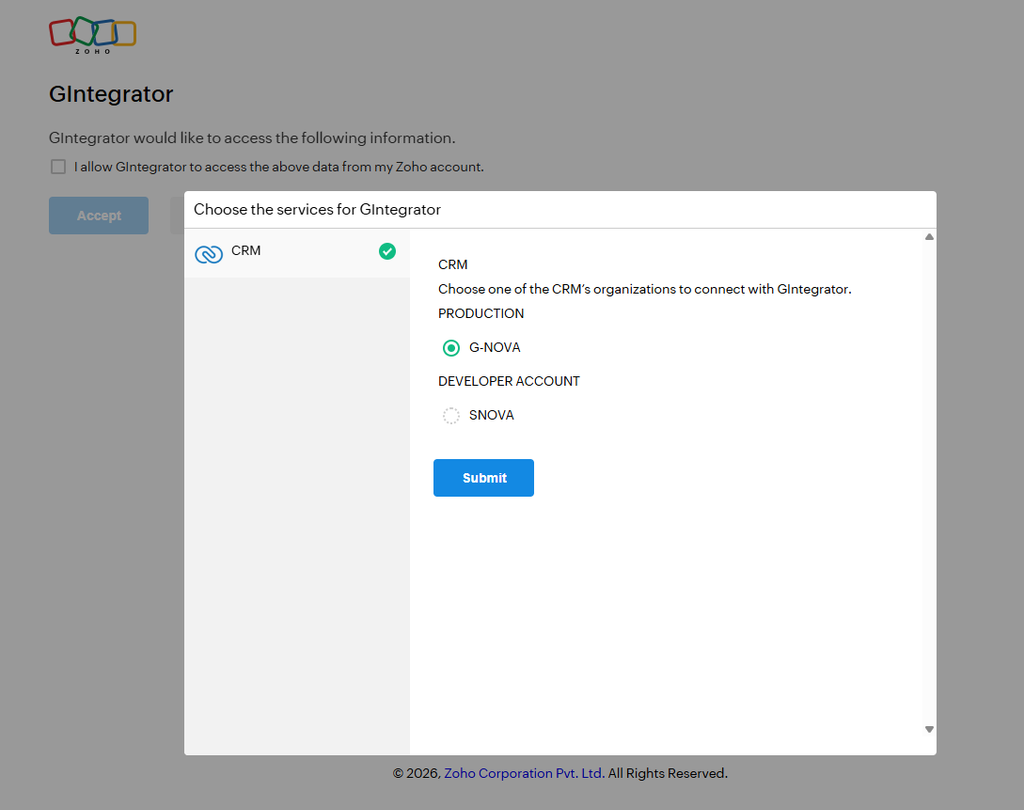
Step 1: Connect Google Sheets to Zoho CRM
First, install the add-on in a Google Sheets spreadsheet. Then open:
Extensions → G-Integrator for Zoho CRM → Zoho Sign In
Sign in through Zoho’s own consent screen. The add-on never sees your password, and you can revoke access from your Zoho account at any time.
Step 2: Run your first COQL query
Next, click Get Data using COQL in the add-on menu. Type your query into the editor and run it:
SELECT Last_Name, First_Name, Email, Created_Time
FROM Contacts
WHERE Created_Time > '2026-01-01T00:00:00-05:00'
The matching rows land in your sheet, one record per row, with a header row on top.
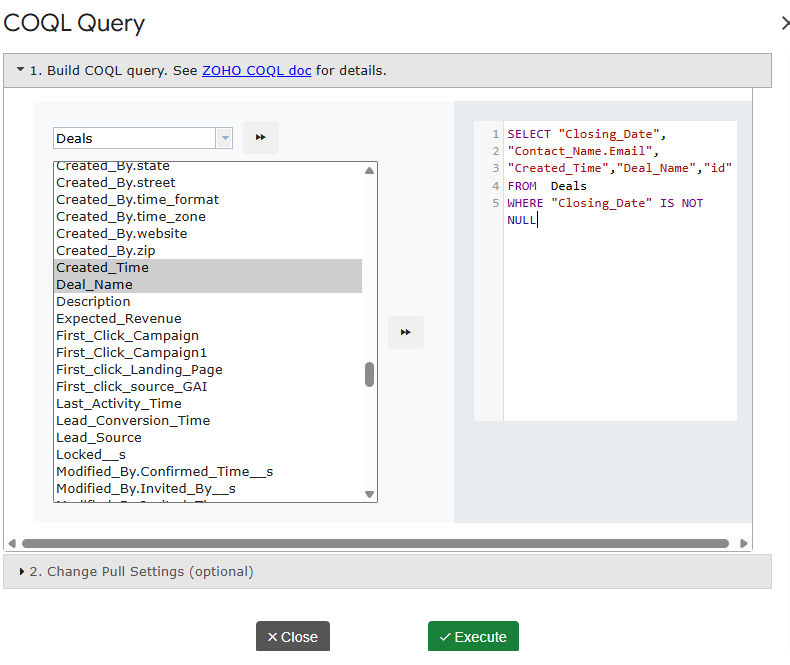
Additionally, the add-on saves the query as a template. As a result, you can re-run it later with one click — or on a schedule, as we will see below.
Example queries you can copy
Filter by a picklist and sort
SELECT Deal_Name, Amount, Stage, Closing_Date
FROM Deals
WHERE Stage = 'Negotiation/Review'
ORDER BY Closing_Date asc
Join: pull account fields onto each deal
Lookup fields act as your join keys. For instance, each deal has an Account_Name lookup, so you can reach fields on the account through dot notation:
SELECT Deal_Name, Amount, Account_Name.Account_Name, Account_Name.Industry
FROM Deals
WHERE Amount > 10000
Every row now shows the deal next to its account’s name and industry. In SQL terms, this is an inner join — yet you wrote no JOIN clause at all.
Two levels deep
COQL follows lookups across two relations. For example, from a contact you can reach the owner of its parent account:
SELECT Last_Name, Account_Name.Account_Name, Account_Name.Owner.last_name
FROM Contacts
WHERE Account_Name is not null
One-to-many: repeat the parent for each child
A one-to-many pull lists child records with their parent’s fields on every row. To do that, query the child module and join up to the parent:
SELECT Account_Name.Account_Name, Deal_Name, Amount, Stage
FROM Deals
WHERE Account_Name.Industry = 'Technology'
ORDER BY Account_Name.Account_Name asc
The result reads like a report: each account appears once per deal, ready for a pivot table. Afterwards, you can group by account in the sheet to get totals per parent.
Multiple conditions
SELECT Last_Name, Email, Lead_Source, City
FROM Leads
WHERE (Lead_Source = 'Web' or Lead_Source = 'Referral') and City is not null
Wrap OR groups in parentheses, just as you would in SQL.
Step 3: Refresh your queries on a schedule
Finally, put the whole thing on autopilot. Open Workflows in the add-on menu and attach your saved COQL template to a schedule — hourly, daily, or weekly.
From then on, the sheet re-runs the query and rewrites the rows on its own. Consequently, any chart or pivot table built on that tab stays current without any clicks. See the automation guide for the details.
COQL tips and common errors
- “WHERE clause is mandatory.” Add
WHERE id is not nullwhen you want everything. - Unknown field. Use the API name, not the display label. Find API names under Setup → Developer Space → APIs in Zoho CRM.
- Dates and times. Use ISO format with a timezone offset, e.g.
'2026-01-01T00:00:00-05:00'. - Large results. Zoho returns records in pages. The add-on pages through them for you, so you get the full result set in one run.
- Start small. Test with a tight WHERE clause first. Then widen it once the columns look right.
What does it cost?
G-Integrator for Zoho CRM comes with a free two-week trial, so you can test COQL pulls, templates, and workflows with your own data before you pay. After that, Premium plans bill monthly or yearly. Check the pricing page for current plans.
Frequently asked questions
Do I need to know SQL to use COQL?
Basic SELECT/WHERE knowledge is enough. In fact, the examples above cover most day-to-day needs — copy one and swap in your fields.
Can COQL join Zoho CRM modules?
Yes, through lookup fields. Dot notation such as Account_Name.Industry reaches fields on the related record, up to two relations deep.
How do I pull one-to-many data, like all deals per account?
Query the child module (Deals) and select parent fields through the lookup. Each child row then carries its parent’s fields, which makes grouping in Google Sheets easy.
Can the query refresh automatically?
Yes. Save the query as a template, then attach it to a workflow. The add-on re-runs it hourly, daily, or weekly and rewrites the rows in your sheet.
Which Zoho CRM editions support COQL?
COQL is part of Zoho’s API v2 and later, and it is available on standard editions. The add-on talks to that API, so if your edition has API access, COQL works.
Wrap-up
Flat exports answer flat questions. For joined and one-to-many data, COQL is the sharper tool — and with G-Integrator, it runs right inside Google Sheets, on a schedule if you like. Install G-Integrator for Zoho CRM, paste one of the examples above, and you will have joined CRM data in your sheet within five minutes. The two-week trial gives you full access to try it with your own modules.